文章
STEPCON(步进电机) control with esd EtherCAT Master and EtherCAT Workbench
Demo system
- One Driver: Yakotech MS-Mini3E V5.0 stepcon driver
- MS-Mini3E_用户手册.pdf.
- The driver supports 4 modes: CSP, PP, PV, Homing.
- Open-loop(开环电机) Motor: Kinco 2S56Q-02741, 42 mm, open-loop, 2 phases hybrid stepping motor
- Close-loop(闭环电机) Motor: 亿星科技 42BH250-48B-H, 42 mm, close-loop (EA+,EA-,EB+,EB-,GND,VCC), 2 phases hybrid stepping motor。
- 注意:当驱动器处于
4. 闭环矢量控制模式时,操控此闭环电机的pp模式,会报过载错误。故选用3. 闭环超前角2模式进行pp模式操控。
- 注意:当驱动器处于
Preparation
copy ESI YAKO_MS_ECAT_V2.4.xml to the esd Workbench ESI folder C:\Program Files (x86)\esd\EtherCAT\EtherCAT Workbench\SlaveLibrary.
Demo - run under PV mode (open-loop motor)
使用 esd EtherCAT Workbench进行配置
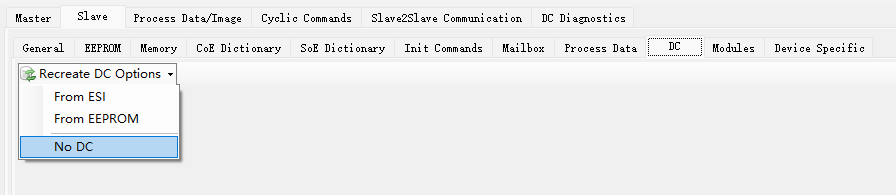
- PreOP 状态下,点击
Slave -> DC,选择No DC。如下图。
- PreOP 状态下,点击
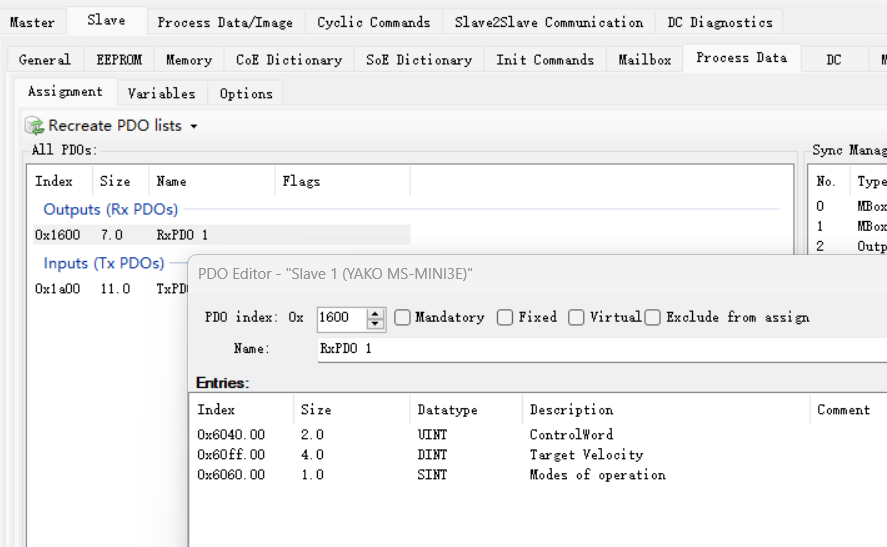
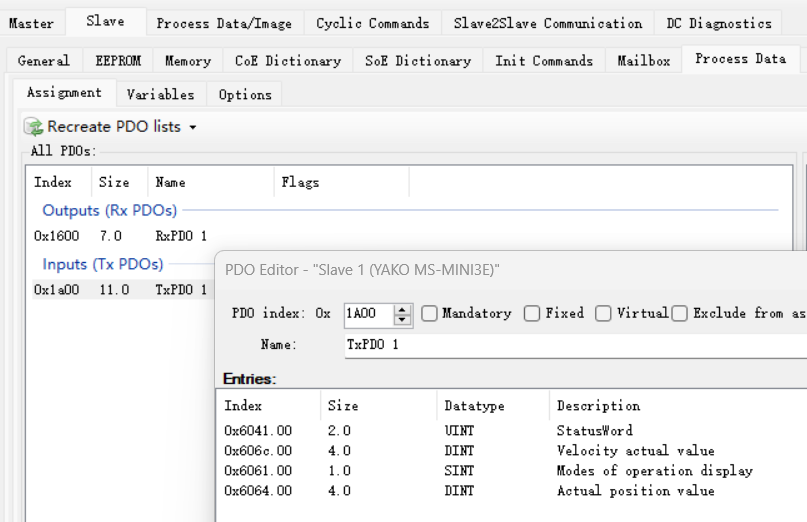
Slave -> Process Data, 在All PDOs栏位中,双击0x1600和0x1a00,调整其中的Entries,并且删除其余的RxPDO 和 TxPDO。如下图。
-
PreOP 状态下,点击
Slave -> Mailbox -> CoE, 点击鼠标右键选择Append new item,依次新增以下内容。- Index: 2206, Sub Index: 0, Data: 01, Transitions: PS //驱动器运行模式改为开环模式。
- Index: 2207, Sub Index: 0, Data: 0x64 (100), Transitions: PS //驱动器匹配42电机。
- Index: 6083, Sub Index: 0, Data: 0x0007a120 (500000), Transitions: PS //加速度。
- Index: 6084, Sub Index: 0, Data: 0x0007a120 (500000), Transitions: PS //减速度。
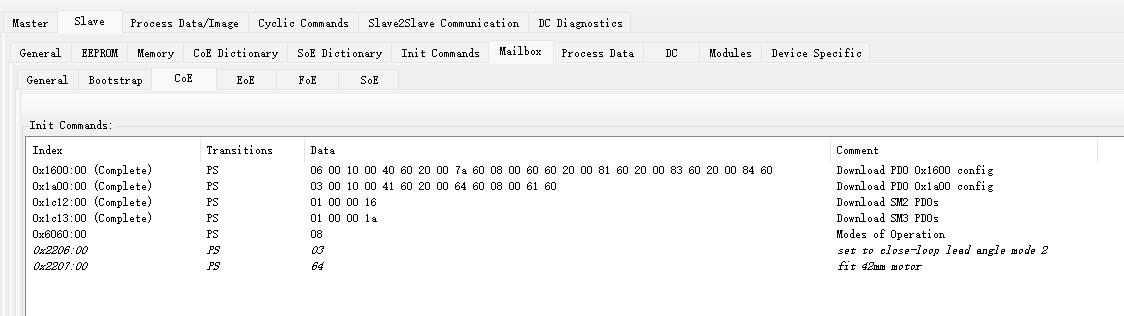
也可以按照下图所显示的路径,在
CoE Dictionary中来配置这些命令。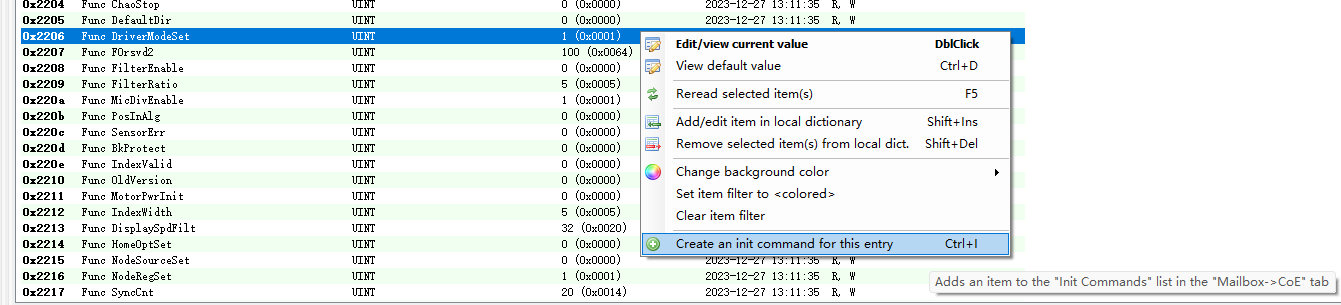
-
配置完毕后,点击
Free run,查看MS-Mini3E是否能进入OP状态。如能正常进入OP状态,则可以点击Export ENI,生成ENI文件(.xml格式),起名eni_pv_ms-mini3e.xml
基于esd EtherCAT Master写应用程序控制EtherCAT驱动器驱动电机
- 在Linux下编译 ecmPvMsmini3e.c 。此 Demo 的主要功能为,建立对 output process image中变量 control word, target velocity 和 mode of operation的引用,让电机在 Profile Velocity模式下运行,使电机进入op模式,先给定一个顺时针的速度每隔三秒递增一下速度,递增三次后再给定一个逆时针的速度,也是每隔三秒递增一下速度,递增三次后结束电机运行,退出程序。
*pMop = 3;
*pCw = 0x000f;

*pTv = 0x00010000; //clockwise rotate
for (int i=0;i<3;i++)
{
    ecmSleep(3000);
    *pTv+= 0x00001000; //increase speed
}
ecmSleep(3000);

*pTv = 0xFFFF0000; //counter-clockwise rotate
for (int i=0;i<3;i++)
{
    ecmSleep(3000);
    *pTv-= 0x00001000; //increase speed
}
ecmSleep(3000);

*pCw = 0;
ecmSleep(1000);
- 在Linux下编译 ecmPvMsmini3eTR.c。此 Demo 的主要功能为,建立对 output process image中变量 control word, target velocity, mode of operation 和 input process image中的变量 status word 和 velocity actual value 的引用,使用 SDO Download 修改Index: 0x6083 (加速度) 和 Index: 0x6084 (减速度) 将加速度和减速度降下来,再使用 SDO Update 读取这两个objects的值确保写入正确,然后使电机进入op模式,在profile velocity模式下运行,电机缓慢加速至指定速度后继续运行5秒钟,然后 disable op,电机缓慢停止直到运行 Velocity actual value 降到 0后,退出程序。
*pMop = 3;
*pCw = 0x000f;
*pTv = 0x0000c000; //clockwise rotate

while (1)
{
    if((*pSw) & 0x0400) //target reached.
    {
        printf("Target velocity reached, keep on running for 5 seconds.\n");
        ecmSleep(5000);
        *pCw = 7;
        printf("Stop running... \n");
        while (1)
        {
            if ((*pVav) == 0) //velocity actual value is 0
            {
                printf("Stopped. \n");
                break;
            }
        }
        break;
    }
}
Demo - run under PP mode (close-loop motor)
使用 esd EtherCAT Workbench进行配置
-
在PreOP状态下,点击
Slave -> DC,选择No DC。如上图。 -
PreOP 状态下,点击
Slave -> Process Data, 在All PDOs栏位中,双击0x1600和0x1a00,调整其中的Entries,并且删除其余的RxPDO 和 TxPDO。如下图。
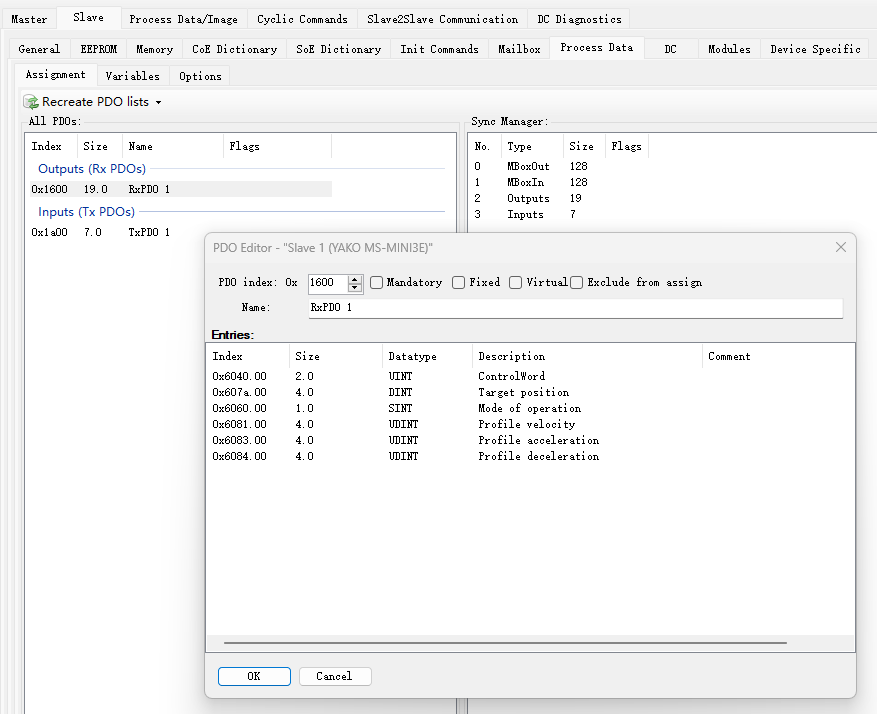
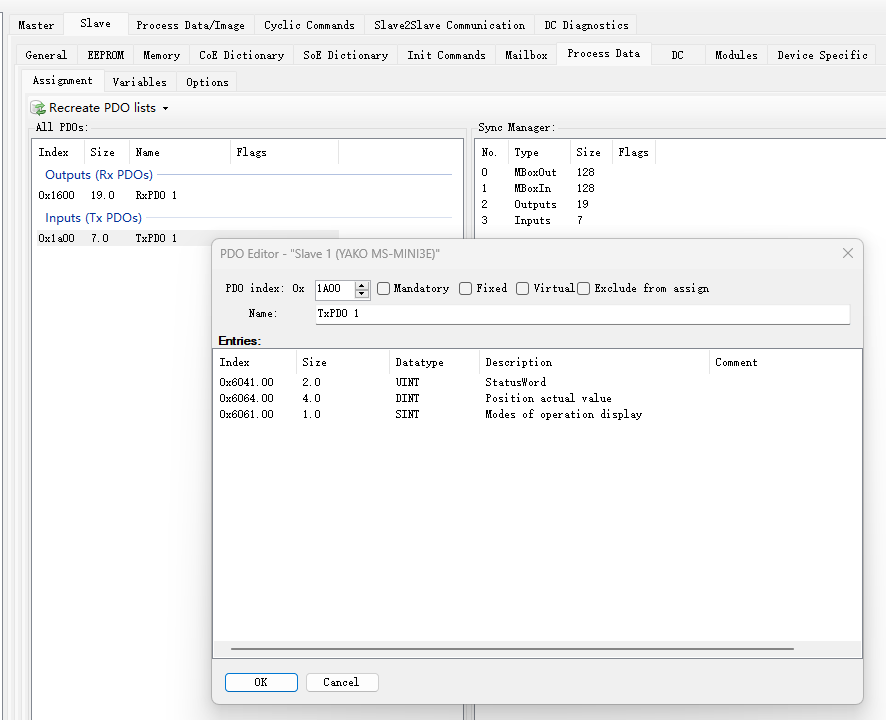
- 查看
Process Data/Image,输入输出的变量及其逻辑地址如下图。
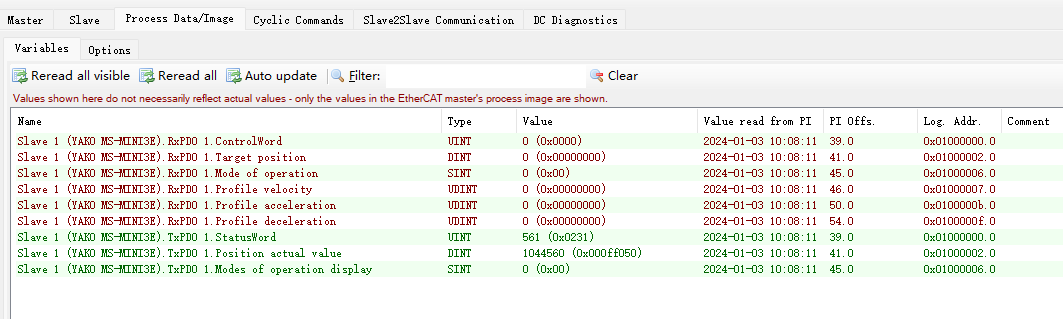
- PreOP 状态下,点击
Slave -> Mailbox -> CoE, 点击鼠标右键选择Append new item,依次新增以下内容。- Index: 2206, Sub Index: 0, Data: 03, Transitions: PS //驱动器运行模式改为闭环超前角 2 模式。
- Index: 2207, Sub Index: 0, Data: 0x64 (100), Transitions: PS //驱动器匹配42电机。
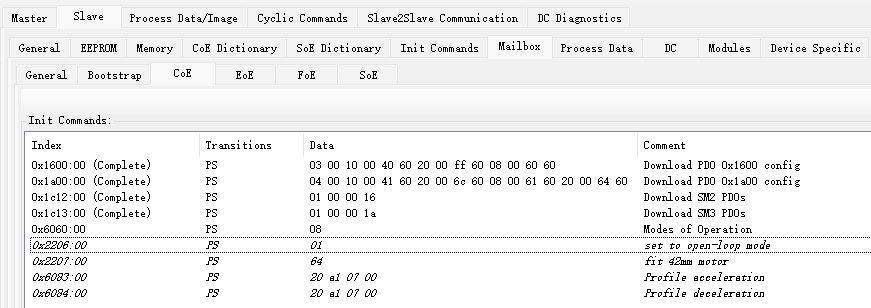
- 配置完毕后,点击
Free run,查看MS-Mini3E是否能进入OP状态。如能正常进入OP状态,则可以点击Export ENI,生成ENI文件(.xml格式),起名eni_pp_ms-mini3e.xml
基于esd EtherCAT Master写应用程序控制EtherCAT驱动器驱动电机
一、在Linux下编译 ecmPpAbsMsmini3e.c。此 Demo 的主要功能为,建立对 output process image中变量 control word, target position, mode of operation, profile velocity, profile acceleration, profile deceleration和 input process image中的变量status word和position actual value 的引用。然后使电机进入op模式,在profile position模式下运行。
(1) 给电机一个正的绝对位置,让电机运行到指定的位置后,再给一个负的绝对位置让电机继续运行到指定位置。 (2) 给电机一个正的绝对位置,在电机未到达此位置前,给定一个新的负的绝对位置,并且让电机停止目前的运行,立刻往新的位置运行,直到到达指定位置为止。
ecmSleep(1000);
printf("Current position value is %d.\n", *pPav);
*pMop = 1; //pp mode
*pTp = 1000000; //target postion 1,000,000
*pPv = 0x0000f000; //profile velocity
*pPa = 0x00004e20; //profile acceleration
*pPd = 0x00004e20; //profile deceleration
*pCw = 0x003f; //absolute position, set-point updated, change immediately
ecmSleep(1000);
*pCw = 0x000f;
printf("Target position set to absolute %d.\n", *pTp);

while (1)
{
    if((*pSw) & 0x0400) //target reached.
    {
        ecmSleep(3000);
        printf("Target reached, position actual value is %d.\n", *pPav);
        *pTp = -5000;
        *pCw = 0x001f; //absolute position, set-point updated
        ecmSleep(1000);
        *pCw = 0x000f;
        printf("Target position set to absolute %d.\n", *pTp);
        while (1)
        {
            if ((*pSw) & 0x0400)
            {
                ecmSleep(3000);
                printf("Target reached, position actual value is %d.\n", *pPav);
                // *pCw = 0;
                // ecmSleep(1000);
                break;
            }
        }
        break;
    }
}

*pTp = 2000000;
*pCw = 0x003f; //absolute position, set-point updated, change immediately
ecmSleep(1000);
*pCw = 0x000f;
printf("Target position set to absolute %d.\n", *pTp);
ecmSleep(5000);
//During motor rotates, update the position.
//Instead of waiting target reached, change to the new position immediately.
printf("Current position value is %d. Target NOT reached!\n", *pPav);
*pTp = -100000;
*pCw = 0x003f; //absolute position, set-point updated, change immediately
ecmSleep(1000);
*pCw = 0x000f;
printf("Target position set to absolute %d.\n", *pTp);
ecmSleep(10000);

while (1)
{
    if ((*pSw) & 0x0400)
    {
        ecmSleep(3000);
        printf("Target reached, position actual value is %d.\n", *pPav);
        *pCw = 0;
        ecmSleep(1000);
        break;
    }
}
二、在Linux下编译 ecmPpRelMsmini3e.c。此 Demo 的主要功能为,建立对 output process image中变量 control word, target position, mode of operation, profile velocity, profile acceleration, profile deceleration和 input process image中的变量status word和position actual value 的引用。然后使电机进入op模式,在profile position模式下运行。
(1) 给电机一个正的相对位置,让电机运行到指定的位置后,再给一个负的相对位置让电机继续运行到指定位置。
ecmSleep(1000);
printf("Current position value is %d.\n", *pPav);
*pMop = 1; //pp mode
*pTp = 100000; //target postion 100,000
    printf("Target position set to relative %d.\n", *pTp);
*pPv = 0x0000f000; //profile velocity
*pPa = 0x00009c40; //profile acceleration
*pPd = 0x00009c40; //profile deceleration
*pCw = 0x007f; //relative position, set-point updated, change immediately
ecmSleep(1000);
*pCw = 0x000f;

while (1)
{
    if((*pSw) & 0x0400) //target reached.
    {
        printf("(%d) Target reached, position actual value is %d.\n", ++iCount, *pPav);
        ecmSleep(3000);
        if (iCount==5)
        {
            ecmSleep(1000);
            break;
        }
        *pCw = 0x005f; //relative position, set-point updated
        ecmSleep(1000);
        *pCw = 0x000f;
        continue;
    }
}

printf("---Opposite direction---\n");
iCount = 0;
*pTp = -100000; //target postion -100,000
printf("Target position set to relative %d.\n", *pTp);
*pPv = 0x00012000; //profile velocity
*pPa = 0x00013880; //profile acceleration
*pPd = 0x00013880; //profile deceleration
*pCw = 0x007f; //relative position, set-point updated, change immediately
ecmSleep(1000);
*pCw = 0x000f;

while (1)
{
    if((*pSw) & 0x0400) //target reached.
    {
        printf("(%d) Target reached, position actual value is %d.\n", ++iCount, *pPav);
        ecmSleep(3000);
        if (iCount==5)
        {
            *pCw = 0;
            ecmSleep(1000);
            break;
        }
        *pCw = 0x005f; //relative position, set-point updated
        ecmSleep(1000);
        *pCw = 0x000f;
        continue;
    }
}
homing mode
supported homing methods it declared are method 17, 18, 24 and 29 which can be set in index:6098h.
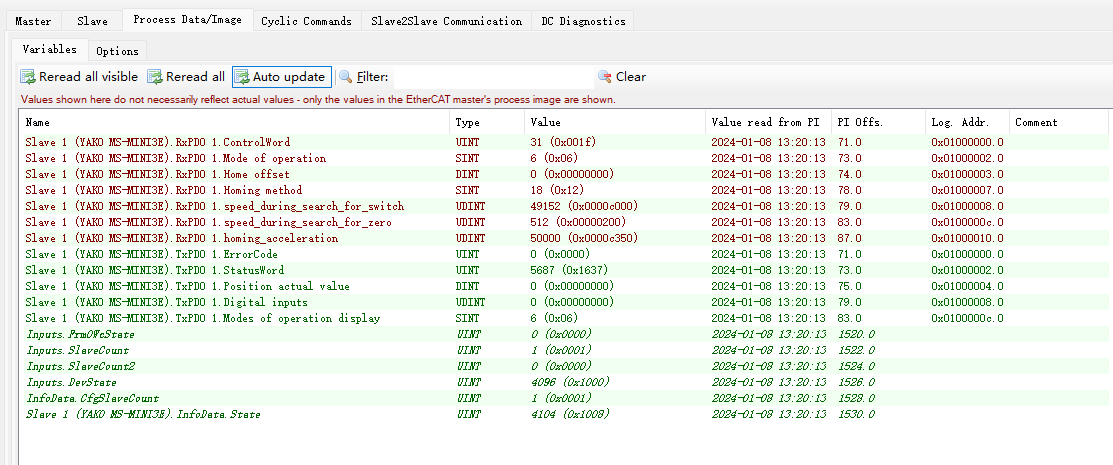
example of the variables listed in process image of homing mode.
method 17 (反方向寻找负限位信号),参考流程。
step 1: 配置Objects
- 6060h: 6 //operation mode set to homing mode
- 6098h: 17 //homing method set to 17
- 6099h 01: 0x0000c000 //homing speed (speed_during_search_for_switch) set 49,152 pul/s
- 6099h 02: 0x00000200 //homing speed (speed_during_search_for_zero) set 512 pul/s, the less the speed the more accurate it find zero position.
- 609Ah: 0x0000c350 //homing acceleration set to 50,000 pul/s^2
step 2: start homing by set 6040h to 0x001f,电机以 6099h01 的速度向负方向运动,开始寻找负限位。
step 3: 当到达负限位, X2负限位输入信号被触发,60FDh Digital inputs 会被赋值为 01 (6041h status word bit 11 internal_limit_active is set)。同时电机开始减速,停止后开始以6099h02 的速度向正方向运动,直至X2负限位输入信号不被触发 (60FDh 为 0, and 6041h status word bit 11 internal_limit_active is clear) 时停止运行,homing 结束 (6041h status word bit 10 target reached is set, bit 12 homing attained is also set),同时将 606C position actual value 清零(如果607Ch home offset的值为0的话)。
method 18 (正方向寻找正限位信号),参考流程。
step 1: 配置Objects,与上述method 17 step 1基本一致,除了 2) 6098h: 18 //homing method set to 18.
step 2: start homing by set 6040h to 0x001f,电机以 6099h01 的速度向正方向运动,开始寻找正限位。
step 3: 当到达正限位, X1正限位输入信号被触发,60FDh 会被赋值为 02 (6041h status word bit 11 internal_limit_active is set)。同时电机开始减速,停止后开始以6099h02 的速度向负方向运动,直至 X1正限位输入信号不被触发 (60FDh 为 0, and 6041h status word bit 11 internal_limit_active is clear) 时停止运行,homing 结束 (6041h status word bit 10 target reached is set, bit 12 homing attained is also set),同时将 606C position actual value 清零。
method 24 (正方向寻找原点,当遇到原点后,减速停止并后退一段距离,之后再以慢速正向查找原点,找到后停止,回原点动作完成。)
step 1: 配置Objects,与上述method 24 step 1基本一致,除了 2) 6098h: 24 //homing method set to 18.
step 2: start homing by set 6040h to 0x001f,电机以 6099h01 的速度向正方向运动,开始寻找原点信号。
step 3: 当到达原点位置, X0原点位输入信号被触发,60FDh 会被赋值为 04。同时电机开始减速,停止后开始以6099h02 的速度向负方向运动,直至 X0原点位输入信号不被触发 (60FDh 为 0)时停止运行,然后再往正方向以6099h02 的速度运动,直至 X1正限位输入信号被触发 (60FDh 为 1)时homing 结束 (6041h status word bit 10 target reached is set, bit 12 homing attained is also set),同时将 606C position actual value 清零。