文章
EoE (Ethernet over EtherCAT)
refer to EtherCAT MainDevice Application Developers Manual and CAN-EtherCAT/2(-FD)
Local IP Port Mode
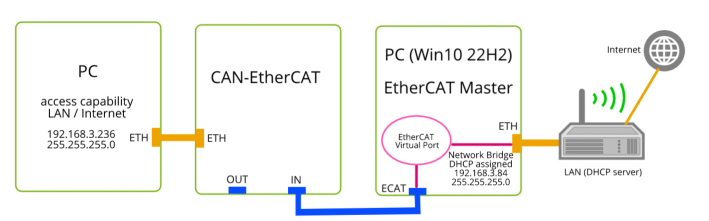
Local IP Port Mode 是指 EtherCAT Master 将 IP 地址分配给指定的支持 EoE 的 Slave 本身,如下图中将 IP 地址分配给 CAN-EtherCAT 设备。
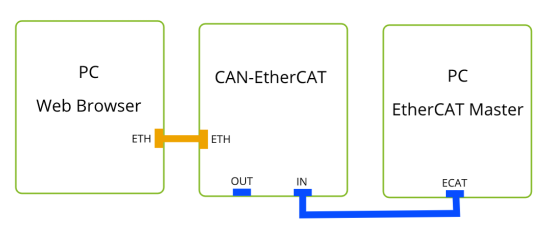
Configure with esd EtherCAT Workbench
- In SubDevice->Mailbox->CoE, insert a command "0x2000:01 PS 01"
- In SubDevice->Mailbox->EoE, Select "IP Port", Uncheck "Use DHCP", set "IP address: 10.236.1.1 ; Subnet mask: 255.255.0.0 ; Default gateway: 10.236.0.1 ; DNS server: 10.236.0.1"
- In the PC which connects to CAN-EtherCAT via "ETH" port, manually change the IP setting of the network adapter which is connecting to "ETH" port, to following values "IPv4 address: 10.236.1.2 ; IPv4 subnet prefix length: 16 ; IPv4 gateway: 10.236.0.1"
- In Workbench, click Free Run, make sure CAN-EtherCAT and EtherCAT MainDevice are both in OP state.
- In the PC, open a web browser to input http://10.236.1.1 , if the webpage sent from CAN-EtherCAT internal web server is displayed, it means communication is set up successfully, and the firmware download and update can be performed as well.
Connect device behind EoE SubDevice to the PC at Master (EtherCAT Workbench) side
使用桥接方式连接 esd EtherCAT Virtual Port 与 Ethernet。
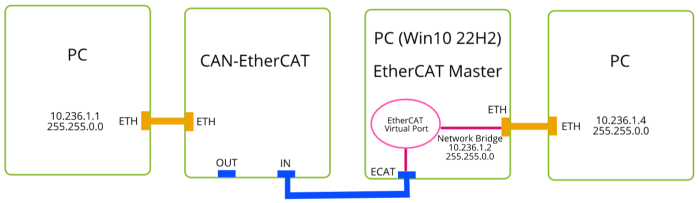
Install Virtual port driver and Bridge it
- Install esd Ethercat Master with "Virtual port driver" component being selected.
- Bridge EtherCAT Virtual Port adapter to the Ethernet adapter which connect to LAN or other PC, so that a Network Bridge adapter is created, and then configure its IPv4 address as below.
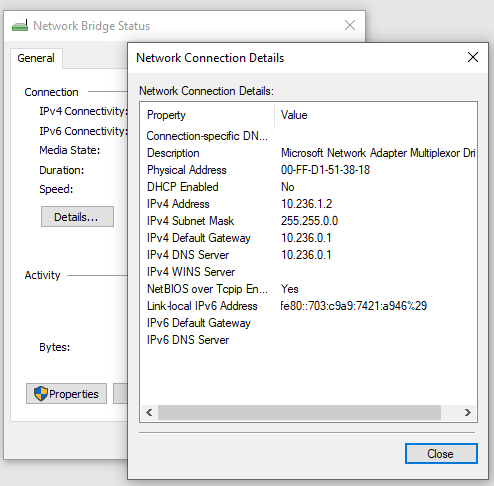
Configure with esd EtherCAT Workbench
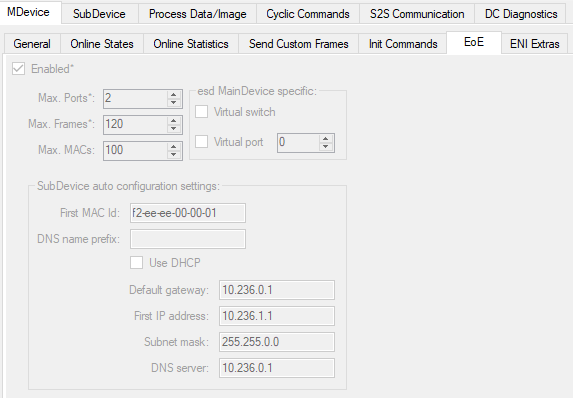
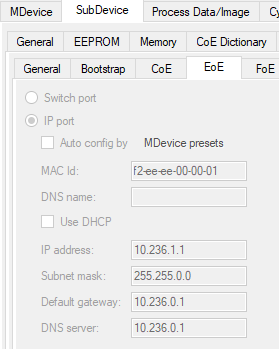
Click "Free Run" in Workbench, make sure all in OP mode. Check IP address of ETH adapter which connects to CAN-EtherCAT ETH port, it's assigned automatically by Workbench as above "10.236.1.1 ; 255.255.0.0".
Manually change the IP address of ETH adapter which connects to EtherCAT Master (EtherCAT Workbench) PC's ETH adapter, to "10.236.1.4 ; 255.255.0.0"
Ping the others' IP address in each PC cmd console, if all gets reply successfuly, that means the communication via EoE is configured properly.
Even can gain the capability to access to LAN/Internet.